Best OST to PST Converter (2026) – Features, Pricing & Free Trial Review

Struggling to open an OST file in Outlook? You’re not alone. Many users face this issue when their Exchange account is deleted, Outlook crashes, or the OST file becomes inaccessible. The problem is simple—OST files are not designed for direct access or migration, which makes recovering your data difficult.
This is where an OST to PST converter becomes essential. It helps you convert inaccessible OST files into PST format, allowing you to restore emails, contacts, attachments, and other Outlook data without losing information.
However, choosing the right tool isn’t easy. Many free OST to PST converters promise results but often lead to incomplete conversion, data corruption, or missing emails—issues that may only become visible later.
To save you time and risk, we tested and compared the best OST to PST converter tools based on features, data safety, pricing, and free trial options. In this guide, you’ll find reliable solutions that actually work—so you can safely convert your OST files without losing critical data.
👉 Looking for a quick solution? Try a trusted OST to PST converter with a free trial and see results before you buy.
What is OST and PST File in Outlook?
Before choosing the right tool, it’s important to understand the difference between OST and PST files—because this is exactly where most users get confused.
An OST (Offline Storage Table) file is created by Microsoft Outlook when you connect to an Exchange, IMAP, or Office 365 account. It allows you to access your emails, contacts, and calendar offline, and automatically syncs changes once you’re back online. However, OST files are tied to the original account and cannot be easily opened or imported into another Outlook profile.
On the other hand, a PST (Personal Storage Table) file is a portable Outlook data file. It is used to store, backup, export, and transfer emails, contacts, and other mailbox data. PST files can be easily imported into Outlook, making them ideal for migration and recovery.
Key Difference Between OST and PST
| Feature | OST File | PST File |
|---|---|---|
| Purpose | Offline access & sync | Storage, backup & migration |
| Accessibility | Linked to specific account | Can be opened anywhere |
| Portability | Not portable | Fully portable |
| Recovery | Difficult without original account | Easy to restore in Outlook |
👉 In short: OST is temporary and dependent, while PST is permanent and flexible.
This is why converting OST to PST becomes necessary—especially when you lose access to your original account or face OST file corruption.
Why You Need an OST to PST Converter
At first, OST files work perfectly in the background—until something breaks. And when it does, accessing your data can quickly become a serious problem.
Here are the most common situations where an OST to PST converter becomes necessary:
🔹 1. Outlook Profile or Exchange Account Deleted
If your Exchange account is removed or your Outlook profile is lost, the OST file becomes useless. You can’t reopen it or import it into a new account.
🔹 2. Corrupt or Inaccessible OST File
Unexpected shutdowns, system crashes, or synchronization errors can corrupt OST files. Once corrupted, Outlook may fail to open the file, leaving your data locked.
🔹 3. Server Crash or Mailbox Unavailable
If the Exchange server goes down or your mailbox is deleted, OST files won’t sync anymore—making recovery nearly impossible without conversion.
🔹 4. Migration or Backup Requirement
Planning to move your data to another system or create a backup? OST files aren’t designed for that. PST is the only format Outlook supports for easy migration.
🔹 5. Need to Access Emails Independently
OST files are tied to a specific account. If you want to access emails without dependency on the original server, converting to PST is the only reliable option.
👉 The reality:
Outlook doesn’t provide a direct way to convert OST to PST in most of these scenarios. That’s why relying on a professional tool becomes essential.
Important Insight
Many users try free or manual methods first—but by the time they realize data is missing or corrupted, it’s already too late.
Free vs Paid OST to PST Converter (Reality Check)
When searching for a solution, most users naturally look for a free OST to PST converter. It sounds like the easiest and cheapest option—but this is where things often go wrong.
❌ Limitations of Free OST to PST Converters
While some free tools may work for very small or simple files, they usually come with serious drawbacks:
- Incomplete Conversion – Missing emails, attachments, or folders
- Data Corruption Risks – Output PST files may be damaged or unusable
- File Size Limits – Cannot handle large or multiple OST files
- No Support for Corrupt OST – Fails when you actually need recovery
- No Customer Support – You’re on your own if something breaks
👉 The biggest issue?
You might not notice these problems immediately. By the time you do, your data could already be compromised.
✅ Advantages of Professional (Paid) Tools
A reliable, professional OST to PST converter is built to handle complex scenarios and protect your data:
- Accurate Conversion with full data integrity
- Supports Large & Multiple OST Files
- Recovers Corrupt or Inaccessible OST Files
- Preserves Folder Structure & Metadata
- Preview Before Conversion
- Dedicated Customer Support
💡 Smart Approach (What Actually Works)
Instead of blindly choosing a free tool, the smarter approach is:
👉 Use a professional tool with a free trial
This allows you to:
- Test features before buying
- Verify data accuracy
- Avoid unnecessary risks
Bottom Line
Free tools may save money upfront—but they often cost more in lost data, time, and frustration.
If your data matters (and it usually does), it’s better to rely on a trusted OST to PST converter with a proven track record.
🏆 Best OST to PST Converter Tools (2026)
After testing multiple tools based on performance, data safety, ease of use, and pricing, here are the most reliable OST to PST converters you can use.
🔹 1. OST Extractor Pro (Top Recommendation)
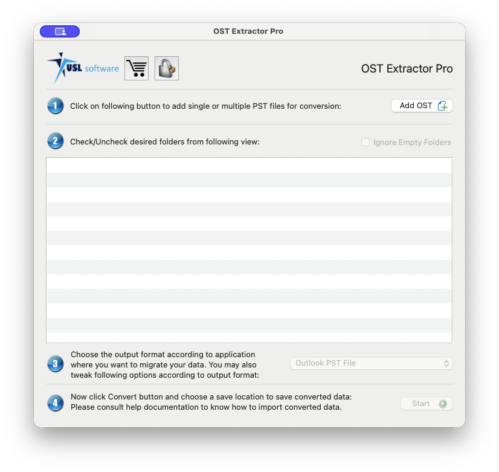
OST Extractor Pro by USL Software is one of the most effective tools for converting OST files into PST format without data loss. It is designed for both technical and non-technical users, offering a clean interface and powerful recovery capabilities.
⭐ Key Features
- Convert multiple and large OST files in a single attempt
- Maintains folder hierarchy and data structure
- Supports all languages, including double-byte characters
- Recovers emails, attachments, metadata, and headers
- Option to exclude unwanted folders before conversion
- Simple and intuitive user interface
✅ Pros
- High accuracy and data integrity
- Works even with corrupt or inaccessible OST files
- Fast processing speed
- Beginner-friendly
⚠️ Cons
- Full features available in paid version only
💰 Pricing & Free Trial
OST Extractor Pro offers a free trial version, allowing you to test its features and preview results before purchasing.
👉 This is ideal if you want to verify accuracy before committing.
Download & Try
👉 Download OST Extractor Pro Free Trial: http://www.ostextractorpro.com
💡 Why We Recommend It
Unlike many basic tools, OST Extractor Pro focuses on data safety and accuracy, which are critical when dealing with Outlook files. It’s a solid choice if you want a reliable, no-risk conversion process.
Pro Tip
If your OST file is important (business emails, client data, etc.), don’t experiment with random free tools first.
👉 Start with a trusted tool that gives you a free trial—you’ll save time and avoid data loss.
OST to PST Converter Comparison (2026)
Choosing the right OST to PST converter can be confusing, especially with so many tools claiming to deliver accurate results. To simplify your decision, here’s a quick comparison:
| Feature | OST Extractor Pro | Other Tools |
|---|---|---|
| Free Trial | ✅ Yes | ⚠️ Limited or Not Available |
| Bulk Conversion | ✅ Yes | ❌ Often Not Supported |
| Supports Corrupt OST | ✅ Yes | ⚠️ Limited |
| Data Integrity | ✅ High | ❌ Risk of Data Loss |
| Ease of Use | ✅ Very Easy | ⚠️ Varies |
| Pricing | 💰 Affordable | 🆓 Free / Low Cost |
🧠 Quick Recommendation
- 👉 Best Choice: OST Extractor Pro (balanced performance, safety, and ease of use)
- 👉 Other Tools: Suitable only for very basic or low-risk use cases
💡 What This Means for You
Most “other tools” may seem attractive because they are free or low-cost, but they often lack the reliability needed for handling important Outlook data.
👉 If your emails, attachments, or business data matter, it’s better to choose a tool that ensures accuracy, safety, and full recovery.
🛠️ How to Convert OST to PST (Step-by-Step Guide)
Converting an OST file to PST is straightforward when you use a reliable tool. Follow these simple steps to safely convert your Outlook data:
Follow these steps to safely convert your OST file into PST format:
👉 This helps you verify that your data is intact.
Important Tips
- Always preview data before conversion
- Avoid interrupting the process for large files
- Use a tool that supports corrupt OST recovery
Pro Tip
Start with the free trial version to check accuracy before converting your complete data.
🔍 How to Choose the Right OST to PST Converter
Not all OST to PST converters are created equal. Choosing the wrong tool can lead to data loss, corrupted files, or incomplete conversion. Here are the key factors you should consider before making a decision:
🔹 1. Data Integrity & Accuracy
The tool should preserve emails, attachments, metadata, and folder structure exactly as they are. Even small errors can create big problems later.
👉 If a tool cannot guarantee accuracy, it’s not worth the risk.
🔹 2. Support for Corrupt OST Files
Many users need conversion because their OST file is already corrupted. Make sure the tool can recover and convert damaged or inaccessible files.
🔹 3. Bulk Conversion Capability
If you’re dealing with large or multiple OST files, choose a tool that supports batch conversion. This saves time and effort.
🔹 4. Ease of Use
A clean and intuitive interface matters—especially if you’re not a technical user. The process should be simple and guided.
🔹 5. Preview Before Conversion
A good converter allows you to preview mailbox data before converting. This ensures everything is intact before final export.
🔹 6. Free Trial Availability
Never buy blindly. A free trial version lets you test the tool’s performance and accuracy before committing.
🔹 7. Customer Support
In case something goes wrong, reliable 24×7 support can save you time and stress.
🧠 Final Tip
Don’t choose a tool just because it’s free or cheap.
👉 Choose based on data safety, reliability, and proven performance.
💡 What We Recommend
Based on these factors, tools like OST Extractor Pro by USL Software stand out because they offer a balance of accuracy, ease of use, and recovery capability—along with a free trial to test everything beforehand.
FAQs on OST to PST Converter Tool
es, some tools offer free OST to PST conversion, but they often come with limitations like file size restrictions, incomplete data conversion, or lack of support for corrupt files.
👉 A better approach is to use a professional tool with a free trial to ensure accuracy before upgrading.
The safest way is to use a reliable OST to PST converter that preserves data integrity, supports corrupt files, and allows preview before conversion. Tools like OST Extractor Pro by USL Software are designed for secure and accurate conversion.
No, OST files cannot be directly opened or imported into Outlook like PST files. They are linked to a specific account and require conversion to PST for access.
Yes, but only with the help of a professional OST to PST converter that supports recovery from damaged or inaccessible OST files.
No, Outlook does not offer a direct method to convert OST to PST in most cases, especially when the original account is inaccessible.
If you use a reliable tool, your data—including emails, attachments, and folder structure—will remain intact. Poor-quality tools, however, may cause data loss or corruption.
It depends on the size of the OST file and the tool used. Most professional tools can convert large files efficiently without compromising performance.
If your data is important, don’t rely on trial-and-error methods.
👉 Use a trusted converter with a free trial to verify results before full conversion.
User Reviews & Feedback
Real user experiences can give you a better idea of how an OST to PST converter performs in practical scenarios. Here’s what users commonly say about tools like OST Extractor Pro:
👤 Rajesh K. (IT Administrator)
⭐ ⭐ ⭐ ⭐ ⭐
“I had multiple large OST files after a server crash, and this tool handled everything smoothly. The folder structure and attachments were perfectly intact.”
👤 Ankit S. (Business Owner)
⭐ ⭐ ⭐ ⭐ ⭐
“I was worried about losing important client emails, but the conversion was accurate. The preview feature helped me verify everything before converting.”
👤 Priya M. (Non-Technical User)
⭐ ⭐ ⭐ ⭐ ☆
“Very easy to use. I’m not very technical, but I was able to convert my OST file without any issues. The interface is simple and clean.”
👤 Suresh T. (Freelancer)
⭐ ⭐ ⭐ ⭐ ☆
“Tried a few free tools earlier, but they didn’t work properly. This one was reliable, though I had to upgrade for full features.”
🧠 Overall User Sentiment
- ✅ High accuracy and data safety
- ✅ Easy to use for beginners
- ✅ Reliable even for large or corrupt OST files
- ⚠️ Full features require paid version
💡 What This Means for You
Most users prefer tools that prioritize data safety over being free. If your emails and attachments are important, choosing a reliable converter makes a noticeable difference.
Final Verdict: Which OST to PST Converter Should You Choose?
If you’re dealing with an OST file that you can’t access, waiting or experimenting with unreliable tools is risky. The chances of data loss, incomplete conversion, or corruption are simply too high.
Based on features, ease of use, and overall reliability, OST Extractor Pro by USL Software stands out as one of the most practical choices for most users.
It offers:
- Accurate and complete data conversion
- Support for large and corrupt OST files
- Simple, beginner-friendly interface
- Free trial to test before purchase
👉 In short: it does the job without unnecessary complications.
🚀 Ready to Convert Your OST File?
If your emails, contacts, or business data matter, don’t take chances with unreliable solutions.
👉 Start with the free trial and see the results yourself before upgrading.
OST Extractor Pro
💡 Final Tip
Don’t choose a tool just because it’s free.
Choose one that ensures data safety, accuracy, and peace of mind.